

Voicemail Analytics
Turn OpenScape Xpressions voicemail and IVR data into actionable reports — call flows, subscriber activity, and server utilization at your fingertips.
Reporting Built for Telephony Teams
VMA connects directly to your Xpressions RepApl SQL reporting database and delivers the reports administrators and analysts need — without manual SQL queries or spreadsheet wrangling.
Direct SQL Integration
Connect to your RepApl database with profile-based connection settings, schema validation, and live connection status.
Saved Report Templates
Define report type, date range, content selection, and summary options once — then rerun with one click.
Flexible Time Periods
Preset ranges or custom start/end dates, with optional UTC display for multi-site deployments.
Granular Content Selection
Choose specific IVR boxes, menus, and subscribers from searchable lists — select all, clear all, or show selected only.
Excel & PDF Export
Export any report grid to Excel or PDF with branded headers, ready for distribution or archival.
User Data Explorer
Load, search, filter, and export subscriber user data directly from the database in a dedicated tab.
Comprehensive Report Library
Three report families cover call processing, subscriber behavior, and server capacity — all from a single application.
Call Processing
- Menu Component Statistics
- Connect Component Statistics
- Input Component Statistics
- Incoming Call Count
- Call Flow Details
Subscriber
- Access Activity
- Message Activity
- Message Count
- Last Login Duration
- Login Details
- User Message Count
Server
- Channel Usage
Simple Workflow
From connection to export in four straightforward steps.
Configure Connection
Set up a named profile with SQL Server host, database, and credentials. VMA validates the RepApl schema automatically.
Select Report & Content
Pick a report category and type, choose your time period, and select the IVR boxes or subscribers to include.
Run Report
Click Run Report and review interactive grid results with full-text search, sorting, and column filters.
Export & Share
Export to Excel or PDF, or open the export folder directly from the results panel.
See It in Action
Real application screenshots showing report configuration, results grids, and export options.
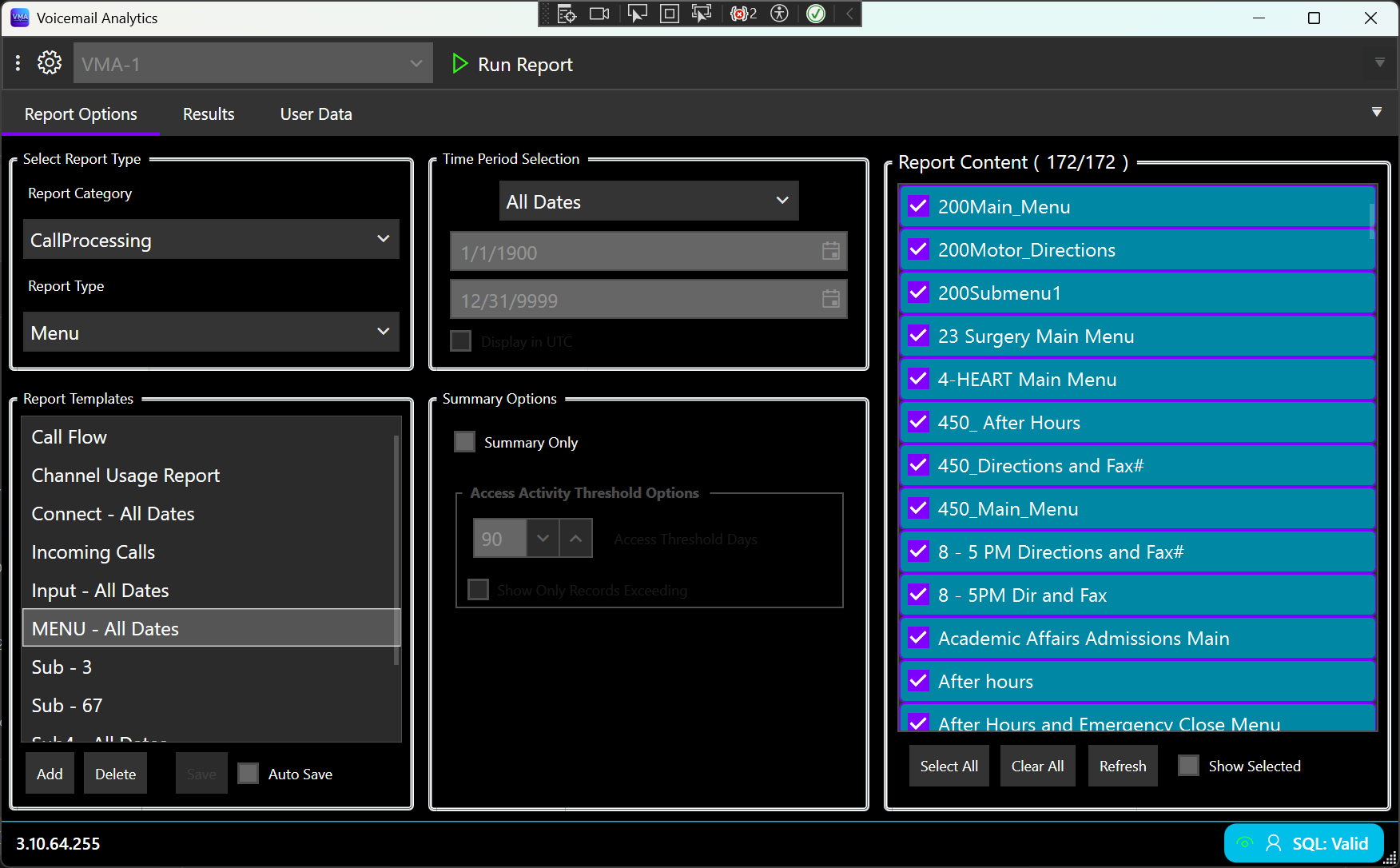
Report Options
Configure report type, saved templates, time period, summary options, and content selection from a unified workspace. Manage multiple connection profiles from the toolbar.
Menu Component Statistics
Track caller keypad selections across IVR menus. View per-application totals with full-text search and one-click Excel or PDF export.
Incoming Call Count
Monitor call volume by IVR box over your selected date range. Identify peak traffic patterns and compare activity across applications.
Call Flow Details
Drill into individual call paths through your IVR applications. Essential for troubleshooting routing issues and optimizing menu design.
Subscriber Message Activity
Analyze sent and received message counts and durations per subscriber — local and network — with sortable columns and selection totals.
Subscriber Access Activity
Review subscriber login and access patterns. Apply threshold filters to focus on accounts exceeding activity limits.
Channel Usage
Monitor server channel utilization to plan capacity and identify bottlenecks in your voicemail infrastructure.
System Requirements
VMA is a Windows desktop application designed for enterprise telephony environments.
Platform
- Windows 10 or later (64-bit)
- .NET 10 runtime (included with installer)
Database
- Microsoft SQL Server
- OpenScape Xpressions RepApl reporting database
- Network access from the VMA workstation
Licensing
- Per-installation license from WPSI
- 30-day evaluation period available
- Settings import from VMA 3.66 supported
Ready to Get Started?
Contact Westridge Professional Services to request a demo, evaluation license, or pricing for Voicemail Analytics.