
C360 Client Tools
The administrator's toolbox for OpenScape 4000 — station inventory, gateway health, HISTA event analysis, and PBX diagnostics in one unified desktop application.
Administration Built for Telephony Teams
C360 Client Tools connects directly to your OS4000 systems, analog gateways, and SFTP data sources — delivering the operational views administrators need without juggling separate utilities.
Profile-Based Connections
Configure named profiles with OS4000 API, gateway, SFTP, and SQL routing settings — switch environments from the toolbar in one click.
Station Data Grid
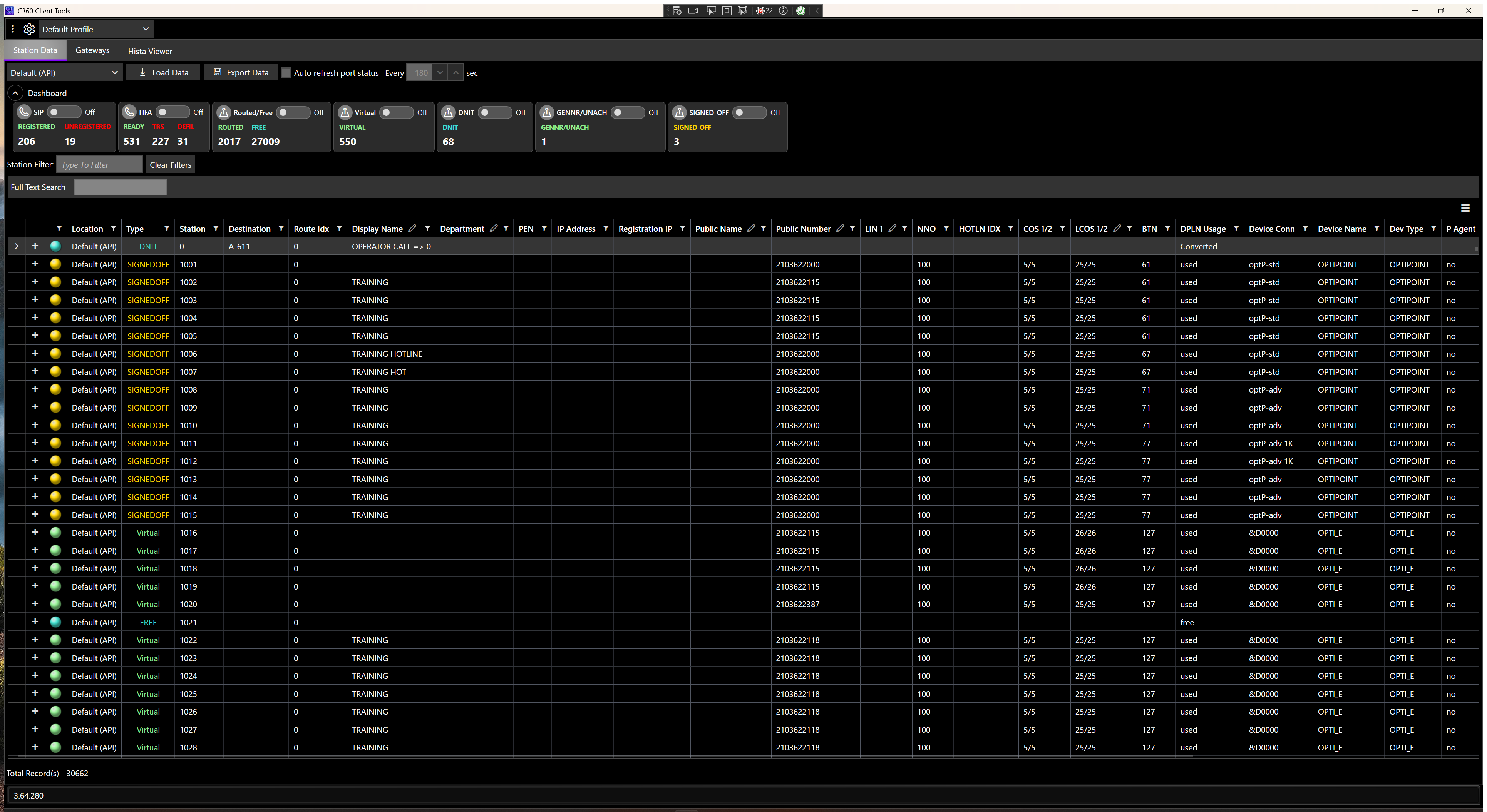
Load location station inventory with SIP, HFA, and virtual filter cards, full-text search, and Excel export for change management.
Gateway Health Monitoring
Track Mediatrix, Patton, and Grandstream gateway connectivity with TCP, SSH, and SFTP tests plus firmware inventory refresh.
HISTA Event Viewer
Import HISTA logs over SSH/SFTP, filter by error code, toggle Emergency/911 view, and export filtered event lists.
PBX Diagnostics
PBX Error List port status monitoring and Call Blocking reports help identify trouble conditions across your deployment.
Managed Updates
Velopack-powered update checks with configurable feed URLs keep field teams aligned with current releases.
Integrated Module Suite
Feature modules cover day-two operations across station management, gateway infrastructure, and event diagnostics.
Station & PBX
- Station Data — OS4000 API inventory
- PBX Error List — port status across connections
- Call Blocking — blocked number statistics
- OSCC Routing SQL integration
- DID Management
- Optional OS4000 in-grid edits
Infrastructure
- Gateway Management — Patton, Mediatrix, Grandstream
- SSH/SFTP connectivity testing
- Model, serial, and firmware refresh
- Background HISTA/AMO SFTP collectors
- Emergency 911 Alerter (SMTP)
Diagnostics
- HISTA Viewer — event log import and analysis
- Error code and full-text filtering
- Emergency/911 dedicated view
- Export filtered HISTA lists
- Multi-location profile support
Simple Workflow
From profile setup to export in four straightforward steps.
Configure Profiles
Define OS4000 API connections, gateway credentials, and SFTP paths in named profiles stored per installation.
Select & Connect
Choose a profile from the toolbar and open the module you need — Station Data, Gateways, or HISTA Viewer.
Load & Monitor
Refresh gateway status, load station inventory, or import HISTA events — then filter and search interactive grids.
Export & Share
Export station data, HISTA lists, or call blocking reports for stakeholders, audits, and change records.
See It in Action
Real application screenshots showing station management, gateway monitoring, and HISTA event analysis.
Station Data
Load station inventory from OS4000 API connections. Filter by device type, search across all columns, and export results. Optional edit mode enables in-grid OS4000 field updates when licensed.
Gateway Management
Monitor analog gateway connectivity with color-coded status indicators. Run Refresh, Test SSH, and Test SFTP against Patton, Mediatrix, and Grandstream devices from a single overview grid.
HISTA Viewer
Import HISTA event logs via SSH/SFTP from configured locations. Filter by error code, toggle Emergency/911 view for rapid triage, and export filtered event lists for further analysis.
Rich Station Grid
Review location, status, destination, IP address, registration, class of service, and device attributes in a sortable, filterable grid designed for enterprise-scale deployments.
System Requirements
C360 Client Tools is a Windows desktop application designed for enterprise telephony environments.
Platform
- Windows 10 or later (64-bit)
- .NET 10 runtime (included with installer)
Connectivity
- Network access to OpenScape 4000 OS4000 API endpoints
- SSH/SFTP access to gateways and HISTA file locations
- Optional SQL Server for OSCC routing integration
Licensing
- Per-installation license from WPSI
- 30-day evaluation period available
- Feature modules enabled per license entitlements
Ready to Get Started?
Contact Westridge Professional Services to request a demo, evaluation license, or pricing for C360 Client Tools.